The best saturation plugins in 2026, and what each one is for
Tape, tube, transformer and multiband saturation plugins compared: what each does to your sound, where it shines, and the free ones worth installing.
By CrystalKarat12 min read
Saturation is the most-used and least-explained process in mixing. Every roundup names the same few plugins and tells you they add “warmth”. This one tries to say what each actually does to a signal, which harmonics it adds, where in the spectrum, and how it behaves when you push it, so you can choose by the job rather than the hype.
Quick picks
- 01ForgeCrystalKaratPlacing exactly the saturation you want in each part of the spectrum$49
- 02DecapitatorSoundtoysFast, characterful analog drive on single tracksPremium
- 03Saturn 2FabFilterDeep multiband control with modulationMid-price
- 04True IronKazrogTransformer weight on every channel, for very littleBudget
- 05SDRR2KlanghelmVersatile everyday saturation at a budget priceBudget
- 06TAIPBaby AudioQuick, modern tape colourMid-price
- 07Satinu-heTape as a whole machine: speed, formulation, wow and delayMid-price
- 08RC-20 Retro ColorXLN AudioLo-fi colour: noise, wobble and degradation in oneMid-price
- 09SaturateNewfangled AudioLoudness and edge without dulling the toneBudget
How we picked
Every plugin here was judged on the same things:
- Sound across the drive range, at matched loudness. Saturation makes things louder, and louder always sounds better for a moment, so every comparison was level-matched.
- What it adds, and where. Even or odd harmonics, how fast they fall away, and whether bass and treble are treated alike.
- Aliasing and latency. How clean it stays without oversampling, and what oversampling costs.
- Workflow. How quickly you reach a good setting, and whether it helps you hear what it’s doing: a mix knob, a delta mode, level compensation.
- Price. Given as a band (free, budget, mid-price, premium), because plugin prices move with every sale. Follow the links for today’s figure.
We make Forge, and it is first because it is what we reach for on these jobs. Everything else is a plugin we would happily use and recommend on its own terms.
What a saturation plugin actually does
A saturator is a waveshaper. It passes each sample through a curve that is straight near zero and bends as the signal gets bigger, so quiet detail goes through untouched and peaks are rounded off. That bend does three things at once:
- It adds harmonics, new frequencies at whole-number multiples of the ones you played. A symmetrical curve adds odd harmonics; a lopsided one adds even ones too.
- It compresses: peaks are squashed more than the body of the sound, so the signal gets denser and louder for the same peak level.
- On anything with more than one note, it intermodulates, creating sum and difference frequencies that are not harmonics of anything. That is where mud comes from.
The flavours differ in the curve’s shape (a soft knee or a hard corner), its symmetry, and what happens around it. Tape and transformers saturate bass before treble because magnetic flux builds up most at low frequencies; tape also loses top end; valves shift their bias under load. Our guide to saturation, distortion and aliasing goes through each with a live demo.
The best saturation plugins in 2026
Ranked by how much of the job each one covers well. A narrower tool lower down can still be the best at its one thing.
01Forgeby CrystalKarat
Multiband saturatorBest for: Placing exactly the saturation you want in each part of the spectrum
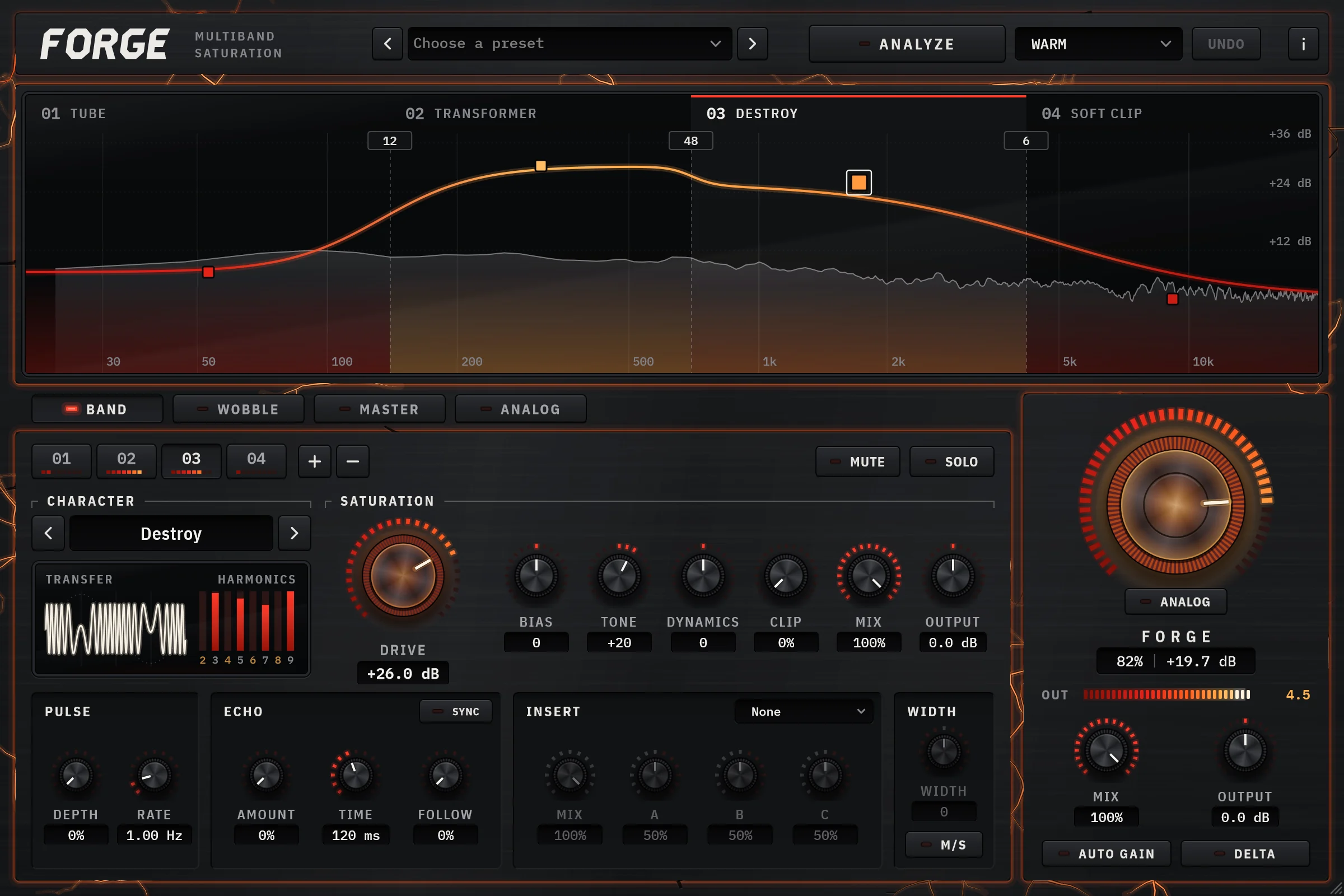
Most saturators give you one curve for the whole signal, so the loudest part of it, nearly always the bass, decides how hard everything else is driven. Forge splits the signal into up to six bands and lets any of its ten characters run on any band: Clean Tape for density, Warm Tape and Transformer with a flux model so the lows saturate first, Tube with a Bias control for even harmonics, Amp, soft and hard distortion, Soft Clip, Bit Crush, and a wavefolder. One plugin covers most of the jobs on this list, in the register where each belongs.
Its Analyze button is the part no other saturator here has. Pick a target (Warm, Punch, Air, Grit, Crush or Master), play four seconds, and Forge sets the crossovers in the valleys of your material’s spectrum, then calibrates each band’s drive to the distortion that target calls for: about 3% for Warm, under 1% for Master. It matches the result to the loudness of what went in, so the first comparison you make is honest. From there every control is yours.
The engineering is the kind you only notice when it’s missing. Most characters use antiderivative antialiasing, so they stay clean without oversampling; the dry path runs through the same phase shifts as the bands, so the Mix knob blends without combing; and latency is reported to your DAW at every oversampling setting.
Why pick it
- Ten characters, any one on any of six bands
- Analyze sets crossovers and calibrated drive from your own audio, then level-matches
- Phase-matched Mix and Delta, and a sub passthrough that keeps the lows dry
- An Analog deck of hiss, hum, crackle and worn-gear behaviour when you want dirt
Know first
- No AAX yet, so it doesn’t load in Pro Tools
- Voiced curves, not models of named hardware: for a specific console or tape machine, see the models below
- More to explore than a one-knob saturator, although Analyze gives you a starting point
- Price
- $49 once, or by subscription · 7-day trial, no card
- Formats
- Windows VST3 · macOS VST3 and AU
Forge is ours: CrystalKarat makes it and publishes this blog. Everything else on this list is another company's, and nobody paid to be on it.
02Decapitatorby Soundtoys
Analog saturation modelerBest for: Fast, characterful analog drive on single tracks
Decapitator is the plugin most engineers reach for when a sound needs attitude in a hurry. Its five styles were built from analysing hardware: A after an Ampex 350 tape preamp, E after an EMI TG console channel, N after a Neve 1057 input stage, and T and P after the triode and pentode settings of a Thermionic Culture Vulture. Drive, a Tone control from dark to bright, low and high cut, Mix for parallel work, and a Punish button that adds 20 dB of drive when subtle is not the brief. It is quick because the styles are so different from each other: you hear the right one within seconds.
Why pick it
- Immediately musical on drums, bass, vocals and synths
- Five distinct voicings from clean colour to fuzz
- Ubiquitous: presets and tutorials everywhere
Know first
- Single band: on a full mix or a bass-heavy bus, the low end drives the curve for everything
- Fixed voicings, with no bias or curve controls
- Premium list price, though it is discounted often
Premium · Regularly discounted; part of Soundtoys 5
Soundtoys's page for Decapitator (opens in a new tab)03Saturn 2by FabFilter
Multiband distortion and saturationBest for: Deep multiband control with modulation
Saturn 2 is the benchmark multiband saturator: up to six bands with crossover slopes from 6 to 48 dB per octave and an optional linear-phase mode, 28 styles across tape, tube, transformer, amp and effect families, and per-band drive, feedback, dynamics and tone. Its modulation system is the deepest of any saturator here: XLFOs, envelope generators, envelope followers, XY controllers and MIDI sources, routed by dragging. The High Quality modes oversample up to 32 times. If you want to animate saturation, or build a sound-design effect out of one, this is where to look after Forge.
Why pick it
- Unmatched modulation for a saturator
- Every format, CLAP and AAX included
- Clear, fast interface with a live display
Know first
- You place every band and set every drive by ear: nothing calibrates the starting point
- Twenty-eight styles and full modulation make it easy to lose an hour
Mid-price · Also sold in FabFilter's bundles
FabFilter's page for Saturn 2 (opens in a new tab)04True Ironby Kazrog
Transformer saturationBest for: Transformer weight on every channel, for very little
True Iron models six transformers, including a UTC 108X, a Western Electric 111C and a Haufe V178, with controls for Crush (up to 48 dB of gain, compensated so the level holds), Strength and Mix, plus a gentle high-pass filter. It is light on the CPU and meant to sit on every track and bus before anything else, adding the low-frequency thickening and slight rounding that transformers give. It does one thing, at a budget price, very well.
Why pick it
- Subtle, authentic iron that stacks well
- Light enough to use on every channel
- Budget price
Know first
- Deliberately narrow: transformer only
- Single band, with no tone shaping beyond the filter
05SDRR2by Klanghelm
Saturation with four modesBest for: Versatile everyday saturation at a budget price
Klanghelm’s SDRR2 offers four modes, Tube, Digi, Fuzz and Desk, from the same developer behind the free IVGI further down. Tube is the one most people keep; Desk is the subtle, console-like option. It is one of the best-value saturators you can buy, and the controls repay ten minutes with the manual, particularly the input calibration.
Why pick it
- Four distinct characters
- Very low price
- Light on the CPU
Know first
- No tape mode
- Input calibration takes a moment to understand
06TAIPby Baby Audio
Neural-network tape saturationBest for: Quick, modern tape colour
TAIP uses a neural network, trained on in-house test signals, to imitate a 1970s tape machine. Drive sets the saturation, Glue adds tape-style compression, and Lo-Shape, Hi-Shape and Presence tilt the tone; Single and Dual modes change the machine. It sounds good almost anywhere you put it and asks for very few decisions, which is the point.
Why pick it
- Convincing tape character with few controls
- Fast to set
- Native on Apple silicon
Know first
- Less control over machine behaviour than a full tape model
- Single band
Mid-price · Often discounted; also in Baby Audio's subscription
Baby Audio's page for TAIP (opens in a new tab)07Satinby u-he
Tape machine, delay and flangerBest for: Tape as a whole machine: speed, formulation, wow and delay
Where TAIP hides the machine, Satin hands you it: tape speed, formulation, bias, emphasis, head gap, noise reduction, wow and flutter, and modes that turn it into a tape delay or a flanger. It is the deepest tape plugin here, and the one to learn if you want to understand why tape sounds the way it does.
Why pick it
- Real depth: every stage of a tape machine
- Doubles as tape delay and flanger
Know first
- Many parameters
- Heavier on the CPU than a simple saturator
08RC-20 Retro Colorby XLN Audio
Lo-fi colour and textureBest for: Lo-fi colour: noise, wobble and degradation in one
RC-20 is less a saturator than a texture box: modules for noise, wobble, distortion, digital degradation, space and magnetic dropouts, each with its own amount. Version 2, released in November 2026, adds an Echo module with the effects inside its feedback loop, a Codec mode and Varispeed. Put it on loops, keys and anything that should sound like it has a past.
Why pick it
- Instant vibe on loops and keys
- Each module dialled separately
Know first
- For texture rather than clean density
- Easy to overdo across a whole mix
Mid-price · Rent-to-own available
XLN Audio's page for RC-20 Retro Color (opens in a new tab)09Saturateby Newfangled Audio
Spectral clipper and overdriveBest for: Loudness and edge without dulling the tone
Saturate is a spectral clipper: it clips in a way that keeps the tonal balance of what you feed it, so drums and masters get louder without going dull or harsh. A Shape control moves from the softest to the hardest clipping curve, and recent versions add an anti-aliasing mode, a Symmetry control for even harmonics and a ceiling. Think of it as level control with character, rather than warmth.
Why pick it
- Clean, transparent loudness
- Budget price
- Useful on drum buses and masters
Know first
- Not the tool for warmth or colour
- Single band
The best free saturation plugins
Free saturation has never been better. These are worth installing today:
- Klanghelm IVGI is the free sibling of SDRR: a single Drive with an Asym Mix control that changes the symmetry (and so the even harmonics) and a Response control that makes the saturation more or less frequency-dependent. No sign-up.
- ChowTape is a physical model of reel-to-reel tape, built from a Stanford research project and originally based on a Sony TC-260. It models magnetic hysteresis, so its saturation depends on what came before, as real tape does. Open source, in every format including CLAP.
- Softube Saturation Knob is one knob and a switch that chooses which part of the spectrum is spared. Fast and useful, though it needs a Softube account and an iLok licence.
- Airwindows (opens in a new tab) publishes hundreds of free, open-source processors, including console, tape and density effects such as ToTape and Density. Plain interfaces, excellent sound.
- Fire is the free option if you want saturation in bands: up to four, each with its own distortion type. More in our multiband roundup.
Forge isn’t free, but its trial is the whole plugin with no card required, so you can hear it on your own sessions before deciding.
Already in your DAW
Before you buy anything, check what your DAW already has:
| DAW | Saturation built in |
|---|---|
| Ableton Live | Saturator, with several curve types and a waveshaper mode; Live 12 Suite adds Roar, with twelve shapes and serial, parallel, multiband and Mid/Side routing |
| Logic Pro | ChromaGlow (Logic Pro 11 and later): Retro Tube, Modern Tube, Magnetic tape, Squeeze and Analog Preamp models |
| Cubase | Magneto II for tape, and Quadrafuzz v2, a four-band distortion |
| FL Studio | Fruity Soft Clipper, Fruity Blood Overdrive and Distructor |
Stock tools are good enough for plenty of jobs. Where they usually fall short is subtlety at low drive, and control over where in the spectrum the saturation lands.
How to choose: match the plugin to the job
Start from the job, not the brand:
- Glue and density on a bus or master: the gentlest curves. Forge’s Clean Tape or its Master target, a tape model at low drive, or Saturate if what you need is level.
- Weight on kick and bass: transformer character on the low band only. Forge’s Transformer on a band below about 150 Hz, or True Iron on the channel.
- Warmth and presence on vocals: tube character with some asymmetry, kept off the sibilance. Forge’s Tube with Bias on the mids, or Decapitator’s E or N styles.
- Edge on drums: Decapitator, or Forge’s Punch target, which sharpens the transients before the shaper so the hits survive.
- Lo-fi and texture: RC-20, or Forge’s Analog deck with Bit Crush on a band.
- Sound design: see our distortion roundup.
If you are choosing between single-band and multiband, our guide to using multiband saturation has settings for drums, bass, vocals and the master bus.
Questions
What does a saturation plugin do?
It passes audio through a curve that bends as the signal gets louder. That adds harmonics, gently compresses peaks so the sound gets denser, and on chords creates intermodulation. Different plugins differ in the curve's shape and symmetry and in how they treat different frequencies, which is what people hear as tape, tube or transformer character.
Is saturation the same as distortion?
It is the same process at a lower intensity. Saturation usually means a soft curve driven lightly, adding a few low-order harmonics you feel more than hear; distortion means driving harder, or into a harder curve, until the added harmonics are an obvious effect.
Should I put saturation on every track?
Light saturation on many tracks can add up to a denser, more cohesive mix, which is how analog consoles and tape behaved. But it stacks: ten tracks at a subtle setting can sum to a harsh mix. Use it where a sound needs density or presence, level-match every time, and check the whole mix with it bypassed.
Do I need oversampling on a saturation plugin?
Oversampling reduces aliasing, the inharmonic tones created when harmonics go past the top of the sample rate. It matters most with hard curves, high drive and bright material. For subtle saturation on bass or vocals it matters little, and some plugins use antiderivative antialiasing to stay clean without it. Turn it up for the final bounce if you are unsure.
What is the best free saturation plugin?
Klanghelm IVGI for general saturation, ChowTape for tape, and Fire if you want it in bands. Softube's Saturation Knob is quick and useful but needs an iLok licence.