The best distortion plugins for sound design, bass and drums
Distortion plugins compared by what they do to a sound: clipping, folding, crushing, feedback and filters, with settings for bass, drums, synths and vocals.
By CrystalKarat11 min read
Saturation adds weight and warmth. Distortion is what you reach for when the sound itself needs to change: a sine bass that has to growl, a drum loop that has to sound broken, a synth that should scream. The plugins that do it well differ less in how much gain they have than in what they do around the clipping: filters, feedback, folding, modulation and, most of all, control over which part of the spectrum gets destroyed.
Quick picks
- 01ForgeCrystalKaratHeavy distortion aimed at one register, with the sub left solid$49
- 02TrashiZotopeThe widest palette of distortion and impulse responsesMid-price
- 03RiftMinimal AudioAggressive, moving distortion for synths and bassMid-price
- 04ThermalOutputDistortion you can performMid-price
- 05Saturn 2FabFilterPrecise multiband distortion with modulationMid-price
- 06Devastor 2D16 GroupGritty diode clipping on drum loops and bass, on a budgetBudget
- 07DecapitatorSoundtoysInstant analog grit, with Punish for morePremium
- 08RoarAbletonDeep distortion already inside Live 12 SuitePart of a suite or DAW
Five ways to break a waveform
Every distortion is a way of bending the waveform. Knowing which kind you are hearing makes it much quicker to find the one you want.
| Kind | What happens | How it sounds |
|---|---|---|
| Soft clipping | Peaks are rounded off gradually | Overdrive: warm, compressed, harmonics that fade quickly |
| Hard clipping | Peaks are cut flat at a ceiling | Fuzz and edge: a dense run of odd harmonics, squarer the harder you push |
| Asymmetric clipping | One half of the wave clips earlier than the other | Adds even harmonics: thicker, more “valve”, less harsh |
| Wavefolding | Peaks past the ceiling fold back down instead of flattening | Metallic, vocal, inharmonic as it goes further; reacts strongly to level |
| Rectifying | The negative half is flipped or removed | An octave up, gated and buzzy |
| Bit crushing and downsampling | Fewer levels, fewer samples | Digital grit and aliasing, used on purpose |
Around that core, three things make a distortion plugin a sound-design tool: a filter after the shaper (to shape the fizz), feedback (to make it ring), and modulation (to make it move). For the theory of why each curve sounds the way it does, see saturation vs distortion, explained.
The best distortion plugins in 2026
01Forgeby CrystalKarat
Multiband saturatorBest for: Heavy distortion aimed at one register, with the sub left solid
Big distortion has a problem: it wrecks the low end along with everything else. Forge puts the wreckage where you want it. Split the sound into up to six bands and give each its own character: Hard Distortion’s near-brickwall clip on the mids, Destroy’s sine wavefolder on the top, Bit Crush taking a band from 16 bits down to 3, Amp on the low-mids, and a band of clean or lightly driven sub underneath. Analyze’s Crush target sets this up for you, with 48 dB/oct crossovers so the sub stays solid under 20 to 30% distortion; Grit does the same with amp and iron for attitude without fizz.
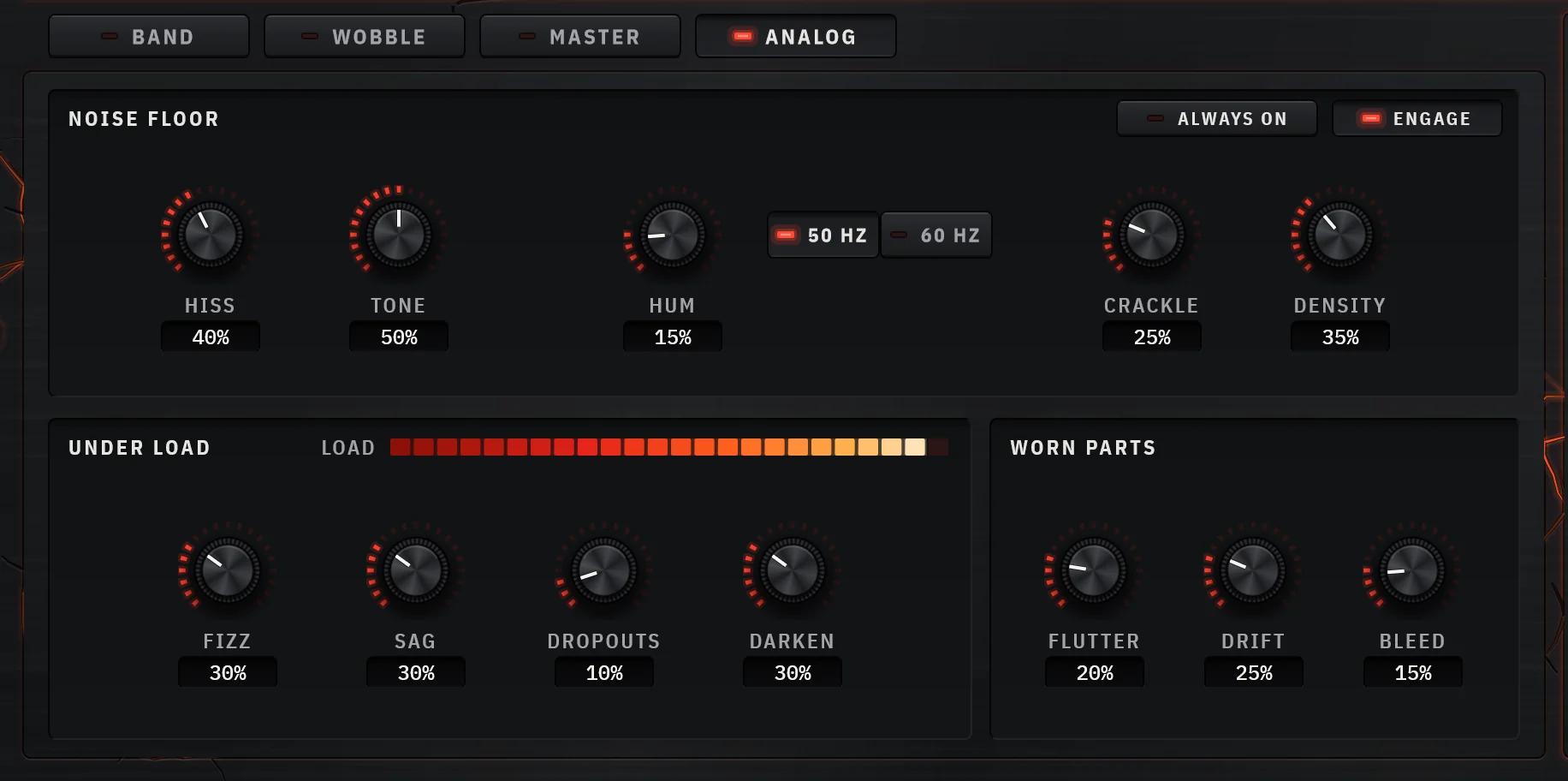
Then each band gets a full effects chain after its shaper: a filter, delay, chorus, flanger, phaser, compressor or bit reducer as its insert, an echo with feedback that can ring as a comb or resonator, and Pulse, a tremolo that runs up to audio-rate AM at 500 Hz. Wobble moves drive, filter, width, pitch, volume and mix, each with its own pattern and rate, so a square-wave drive pulse on eighths can sit under a slow filter sweep. And the Analog deck adds the dirt of failing gear, fizz, sag and dropouts that come more often the harder you drive.
Why pick it
- Wavefolder, bit crusher, hard and soft distortion and amp, any one on any band
- An effect, an echo and a tremolo inside every band, after the distortion
- Six Wobble targets, each with its own oscillator, synced to the host
- Steep crossovers and a sub passthrough keep the low end clean
Know first
- No AAX for Pro Tools yet
- No envelope follower or MIDI-tracked feedback like Rift’s
- Built for mixing as much as mangling, so its extremes are a little tamer than a dedicated sound-design box
- Price
- $49 once, or by subscription · 7-day trial, no card
- Formats
- Windows VST3 · macOS VST3 and AU
Forge is ours: CrystalKarat makes it and publishes this blog. Everything else on this list is another company's, and nobody paid to be on it.
02Trashby iZotope
Multiband distortion and convolutionBest for: The widest palette of distortion and impulse responses
Trash, rebuilt by iZotope in 2024, pairs a distortion module, with a pad that blends between distortion types, with a Convolve module that runs your signal through impulse responses of speakers, objects and spaces. Over 600 distortion types and IRs between them, across up to three bands, with an envelope follower and oversampling. For turning a clean sound into something nobody will recognise, it has few equals.
Why pick it
- Enormous palette
- Convolution makes it more than a distortion
- Free Trash Lite to try the core
Know first
- Three bands at most
- The rebuild lost Trash 2’s delay and dynamics modules
Mid-price · Trash Lite, a single-band version, is free
iZotope's page for Trash (opens in a new tab)03Riftby Minimal Audio
Hybrid distortion and multi-effectBest for: Aggressive, moving distortion for synths and bass
Rift’s engine is multipolar: it processes the positive and negative halves of the waveform separately, with thirty algorithms to choose from, which gives it a range of motion most distortions lack. Its feedback can be tuned to notes or scales so resonances lock to the key of your track, over twenty filter types morph, and an envelope follower, an LFO and two curve generators move it all. Version 2 added multiband processing as a free update.
Why pick it
- Feedback tuned to notes and scales
- Distinctive asymmetric engine
- Play view for speed, Engine view for depth
Know first
- Can be a lot for subtle mix work
- Mid-price
04Thermalby Output
Multi-stage distortionBest for: Distortion you can perform
Thermal stacks up to three distortion stages, each over its own frequency range, with an effects slot per stage, a master compressor and filter, and a circular XY pad that sweeps several distortion parameters at once. It is built for movement: automate the pad and a static loop starts to breathe.
Why pick it
- XY pad for expressive changes
- Over 250 presets
- Effects built in
Know first
- Routing isn’t obvious at first
- Ranges overlap rather than split cleanly
Mid-price · Also part of the Output One subscription
Output's page for Thermal (opens in a new tab)05Saturn 2by FabFilter
Multiband distortion and saturationBest for: Precise multiband distortion with modulation
Saturn 2’s 28 styles run from subtle tape to amp models and heavy effects, across up to six bands, and its modulation system lets envelope followers, LFOs, XY controllers and MIDI drive any parameter. It is the most precise heavy distortion here, at the cost of setting everything yourself.
Why pick it
- Deep, visual modulation
- Linear-phase option for clean splits
Know first
- Fewer extreme textures than Trash or Rift
- Everything is manual
Mid-price · Also sold in FabFilter's bundles
FabFilter's page for Saturn 2 (opens in a new tab)06Devastor 2by D16 Group
Multiband diode-clipper distortionBest for: Gritty diode clipping on drum loops and bass, on a budget
Devastor 2 is built around a diode clipper emulation, with six clipping curves, a one-knob dynamics flattener before it so the distortion stays consistent between loud and quiet notes, and three synth-style filters (low-pass, high-pass, band-pass and band-reject, with resonance) that can run in parallel, in series or mixed. An output limiter keeps it in check. Excellent on drum loops and electronic bass.
Why pick it
- Synth filters around the clipper
- Dynamics flattener for even distortion
- Budget price
Know first
- Dated interface
- One distortion core
07Decapitatorby Soundtoys
Analog saturation modelerBest for: Instant analog grit, with Punish for more
Decapitator is a saturator first, but its P style (a pentode output stage) and the Punish button, which adds 20 dB of drive, take it well into distortion. Fast on drums and synths, and the Tone control and filters make the result easy to place.
Why pick it
- Immediate results
- Musical even when pushed
Know first
- Single band
- Premium list price
Premium · Regularly discounted; part of Soundtoys 5
Soundtoys's page for Decapitator (opens in a new tab)08Roarby Ableton
Saturation and distortion deviceBest for: Deep distortion already inside Live 12 Suite
Roar has twelve shapes, from a soft sine to a diode clipper, a tube preamp and Shards, and routes them single, serial, parallel, multiband or Mid/Side, with a feedback section that can be tuned to a note. Two LFOs, an envelope follower and noise sources modulate it, and a compressor sits at the end. If you have Suite, try it before you buy anything.
Why pick it
- Free if you own Live 12 Suite
- Tuned feedback and rich routing
Know first
- Ableton only
- Not in Live Standard or Intro
Part of a suite or DAW · Ships with Live 12 Suite
Ableton's page for Roar (opens in a new tab)
Free distortion worth having
- Fire: four bands, ten distortion types including foldback, and a downsampler. The best free multiband distortion, and open source.
- iZotope Trash Lite: the core Trash module with over 60 distortion types, free.
- Klanghelm IVGI: better known as a saturator, but it drives into a useful, musical distortion.
- Stock: FL Studio’s Distructor, Cubase’s Quadrafuzz v2 and Ableton’s Saturator (in its waveshaper mode) are all capable before you spend anything.
Making it sit: bass, drums, synths and vocals
Bass and 808s
Keep the sub clean and distort what sits above it. Split somewhere between 80 and 150 Hz, at a valley in the bass’s spectrum, and leave the band below untouched or nearly so; drive the band above it for the harmonics that make bass audible on a phone speaker. If you are working without a multiband plugin, duplicate the bass, high-pass the copy around 120 Hz, distort only the copy, and blend, with delay compensation on so the two stay in phase.
- Compress before the distortion, so loud and quiet notes produce the same amount of harmonics.
- Low-pass after it, somewhere around 3 to 6 kHz, to take the fizz off without losing the growl.
- An 808 that glides moves its fundamental across your crossover. Put the crossover above the highest note’s fundamental, or use a gentler slope so the hand-off is smooth.
- Check in mono: distortion on a wide bass can collapse strangely.
Drums
Distortion flattens transients, which is the opposite of what most drums need. Two ways round it: blend a heavily distorted copy in parallel at 10 to 30%, or sharpen the transients before the shaper so the attack survives the clipping. On a drum bus, distort the mids (where snare crack and room live) and leave the kick’s fundamental mostly clean. A little bit crushing on a parallel band adds crunch without obvious lo-fi.
Synths
Distortion before a filter makes the filter sweep the harmonics it created, the classic acid sound. Distortion after a filter makes the resonance scream. Wavefolders and asymmetric engines react to level, so modulating the drive (with an LFO, an envelope or Forge’s Wobble on Drive) gives movement that a static setting never will.
Vocals
De-ess first, because distortion multiplies sibilance. Then distort a band-limited copy, high-passed around 300 Hz and low-passed around 5 to 6 kHz, and tuck it under the dry vocal. Automate the blend up into the parts that need intensity.
For gentler colour, see our guide to the best saturation plugins.
Questions
What is the best distortion plugin for bass?
One that lets you keep the sub clean while you distort above it. A multiband distortion such as Forge, Saturn 2 or Trash does this in one plugin. With a single-band distortion, distort a high-passed copy of the bass and blend it under the clean original.
What is the difference between overdrive, distortion and fuzz?
They are points on one scale. Overdrive is soft clipping at moderate gain, keeping much of the source's tone. Distortion clips harder and adds more high harmonics. Fuzz clips hardest, approaching a square wave. The names are used loosely, and many plugins cover all three with one drive control.
Why does distortion make my mix muddy?
Distorting several notes at once creates intermodulation: sum and difference tones that are not harmonics of any note, many of them in the low-mids. Distorting fewer notes at a time, splitting into bands, or high-passing before the distortion all reduce it.
Should distortion go before or after EQ?
Both, for different jobs. EQ before distortion changes what gets distorted: cutting lows first gives a tighter result, and boosting a range makes it distort more. EQ after distortion shapes the harmonics it created, usually to tame fizz with a low-pass.