Frequency masking: how to hear it, find it and fix it
What frequency masking is, why sounds sharing a place in the stereo image fight hardest, and the fixes in order: arrangement, level, EQ, sidechain and M/S.
By CrystalKarat10 min read
Every engineer knows the moment: each track sounds fine soloed, and the mix still sounds like a wall. Nothing is too loud and nothing is broken; the parts are simply hiding each other. That is frequency masking, and it is the reason a mix gets clearer when you take things away. This guide explains what it is, why stereo position matters as much as frequency, how to hear and see it, and the fixes in the order worth trying them.
What frequency masking is
Your ear separates sound into overlapping bands, each roughly a third of an octave wide through most of the range and wider in the bass. When a loud sound fills one of those bands, a quieter sound in the same band becomes harder to hear, or vanishes altogether. The quieter sound is still there on the meter; your hearing has just stopped reporting it.
- It spreads upwards. A loud low sound masks the frequencies above it more than a loud high sound masks those below, and the effect widens as level rises. This is why a heavy bass line dulls the guitars and the low-mids of a vocal, and why mud builds from the bottom up.
- It happens in time, too. A loud hit hides what follows it for a few tens of milliseconds, which is part of why a kick and a bass note that start together blur into one event.
- It is relative. A sound is masked by what is around it, not by its own level. Turning the masked track up only starts a level war; making room for it is what works.
Masking isn’t always bad. A little of it glues a mix together, and it hides noise, edits and tails you would rather nobody heard. It becomes a problem when it hides what the song is about: the vocal’s words, the kick’s weight, the bass notes.
Why the stereo image matters as much
Two sounds at the same frequency mask each other most when they also come from the same place. Separate them in space and the ear can pull them apart again: listening tests on spatial release from masking, and the binaural masking level difference (opens in a new tab), measure the gain at several decibels, and up to about 15 dB for low tones in the lab.
For a mix, this means a frequency overlap only matters if the two sounds also share a part of the stereo image. A bass in the middle and a wide pad at the same frequency coexist far better than an ordinary analyser suggests. A vocal in the middle and a mono guitar panned straight up the middle fight hard at the same frequencies. So when you look for masking, look at both dimensions, and when you fix it, the middle of the image is usually where the work is.
How to hear it
- The mute test. Play the full mix and mute one track at a time. If muting the pad suddenly makes the vocal clearer, the pad is masking the vocal. This is the most reliable test there is, because it is your own ear on your own mix.
- Sweep a narrow boost on the masker. On the track you suspect, sweep a narrow boost slowly while the other plays. Where the other track disappears fastest is where they fight. Then remove the boost: it is for finding, not for keeping.
- Listen in mono. Folding to mono takes away the spatial separation, so every overlap in the middle and the sides gets worse at once. If a part vanishes in mono, it was surviving on stereo position alone.
- Turn it down, not up. Listen quietly. Masking changes with level, and a mix that only stays clear when loud is relying on volume, not space.
How to see it on screen
An analyser can show where to look, as long as you remember that two curves overlapping on a screen are not proof that you hear masking. There are three ways to put two tracks on one display:
| Method | How | Catch |
|---|---|---|
| Sidechain overlay | Route the other track or a bus into the analyser’s sidechain, and it draws both curves together | Routing, and the other track is one summed signal |
| Linked instances | Instances of one plugin share their spectra across the session (Pro-Q 4’s instance list, Neutron’s masking meter, smart:EQ 4’s groups, Soap with Link) | Only sees tracks that run the same plugin, and some sandboxed hosts block it |
| Overlap in frequency and image | Soap marks only the ground two sounds share at the same frequency and in the same part of the stereo image | Free with the sidechain; per track with Link |
Whatever you use, read the display with the music playing and the overlap moving. A clash that flashes for one beat is a different problem from one that sits there the whole chorus.
The fixes, lightest first
Try these in order. Each one costs less sound than the next, and the first three solve more masking than every plugin put together.
1. Arrangement
Two parts playing the same notes in the same octave will always fight. Move one up or down an octave, thin a chord voicing, or let one part play in the other’s gaps. If the keys double the bass line, the bass usually doesn’t need them.
2. Decide who wins
In every frequency range, one part should own the space. The vocal owns the presence region while it sings; the kick or the bass owns the sub. Write it down if it helps. Every later fix is about giving the winner its range and moving the others aside.
3. Level and position
Pull the loser down a decibel or two before reaching for an EQ, and pan the parts that can move. Spatial release from masking means a guitar moved from the centre to 30% left can clear a vocal more cleanly than any cut.
4. A complementary cut
Cut the loser where the winner lives, rather than boosting the winner. Two to four decibels with a moderate Q is usually enough; a cut you can hear on the soloed track is often too much. Making a small cut on each of several tracks at the same frequency clears more than one deep cut on one track.
5. A cut that moves with the music
Static cuts thin a part even when the other is silent. A dynamic EQ keyed from the winner, or a sidechain-driven tool such as Soap’s Wash or Trackspacer, cuts only while the winner plays, and only as much as needed. This is the modern way to keep a vocal clear over a dense track without carving the track hollow.
6. Cut in the middle, keep the sides
Because masking is worst where two sounds share a place in the image, a cut on the mid channel of a wide pad clears the space for a centred vocal and leaves the width of the pad alone. Soap’s Wash can be told to cut the middle, the sides, both, or each for its own clashes (its Field setting), and its equaliser puts any band on stereo, mid or side.
7. Harmonics that carry the part elsewhere
When a bass cannot be heard over the kick, saturation adds harmonics an octave and more above the fundamental, where there is room, and the ear fills in the note from them. Our 808 guide uses this trick on purpose.
Five unmasking mistakes
- Boosting the masked track. It wins for a moment, then the masker gets turned up to compete, and the mix gets louder and no clearer.
- Fixing everything everywhere. Masking only matters where it hides something important. Leave the background parts blending; it is what they are for.
- Judging soloed. A cut that sounds terrible on the soloed track often sounds like nothing in the mix, and vice versa. Make the decision with everything playing.
- Trusting overlap on a spectrum. Two curves can overlap at a frequency and never mask each other, because they play at different times or from opposite sides.
- Never checking in mono. Club systems, phones and many speakers sum to mono, and everything the stereo image was separating collides again.
Plugins that find and fix masking
For a longer comparison, including smart:EQ 4, Pro-Q 4 and soothe3, see the best plugins for frequency masking.
01Soapby CrystalKarat
Muddiness removerBest for: Removing the muddiness one track adds to the mix, in frequency and in the image, for free
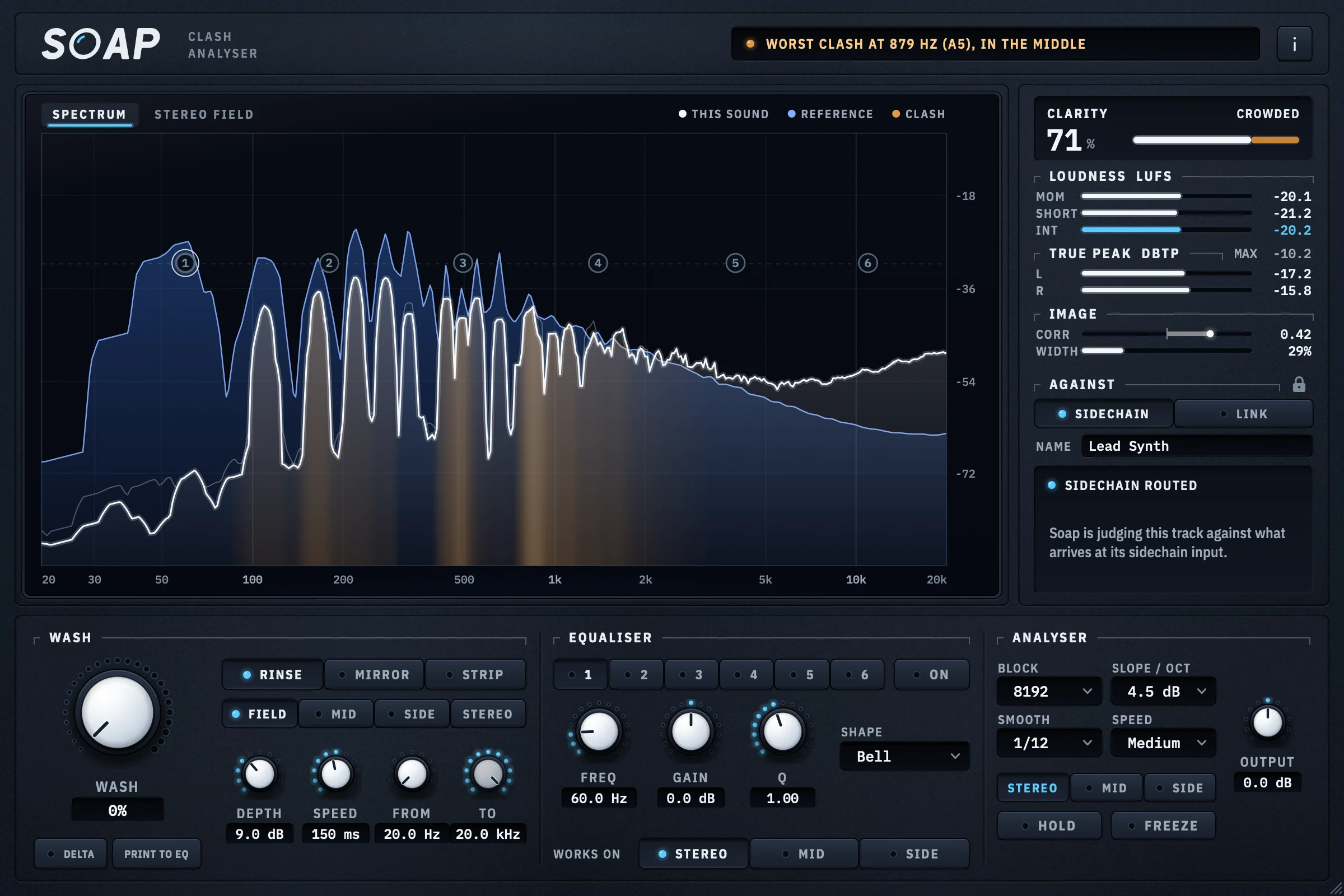
Put Soap on the track that is not sitting right and send the rest of the mix to its sidechain. It draws that track in white over the rest in blue and fills the ground they share in amber, but only where the two also share a place in the stereo image, because two sounds at one frequency on opposite sides mask each other far less. A one-line header names the worst clash and its note, and Clarity sums it up as one figure from 0 to 100 %, weighted by where the track has its energy.
Then the Wash takes the clash out: 60 narrow bells, 30 on the middle of the image and 30 on the sides, that follow it as the music plays, with no latency. Rinse ducks only what clashes, Mirror carves the reference’s shape out whatever this track is doing, and Print to EQ turns the last few seconds of washing into static bands to finish by hand.
Why pick it
- Free, with no key and no time limit
- Counts a clash only where frequency and stereo position both overlap
- Automatic cuts on the mid and the side, or print them to a static EQ
- Bit-transparent with the Wash at zero, so it can stay on as an analyser
Know first
- Free, it needs the rest of the mix routed to its sidechain
- Hearing every track by name without routing (Link) needs Studio Pass
- No AAX for Pro Tools yet
- Price
- Free, with a CrystalKarat account · Link with Studio Pass
- Formats
- Windows VST3 · macOS VST3 and AU
Soap is ours: CrystalKarat makes it and publishes this blog. Everything else on this list is another company's, and nobody paid to be on it.
Trackspacer. Image: Wavesfactory 02Trackspacerby Wavesfactory
Sidechain-driven 32-band ducking EQBest for: One knob that ducks a track wherever the sidechain plays
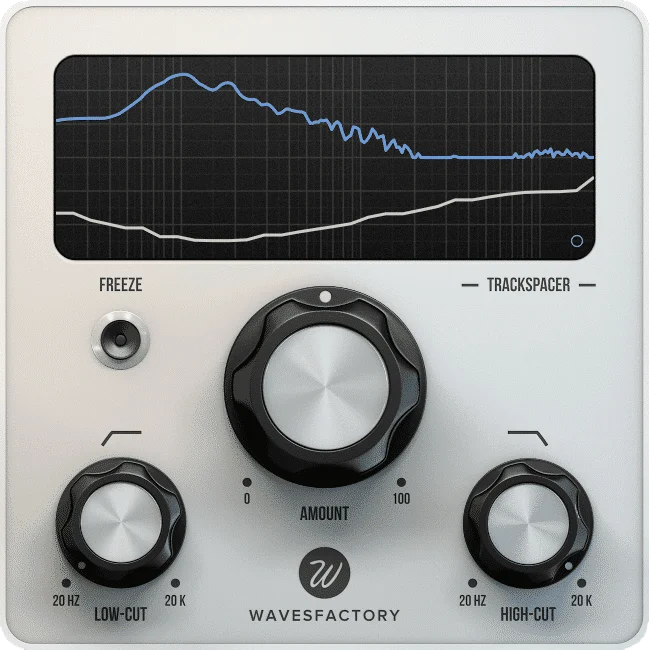
Trackspacer is a 32-band EQ that reads a sidechain and cuts its spectrum out of the track it sits on, so a pad steps back exactly where and when the vocal sings. Its advanced panel adds attack and release, mid, side and stereo targets, and filters on the sidechain. It cuts the sidechain’s shape whether or not the two really overlap, so keep the Amount modest.
Why pick it
- Fast: insert, route, turn up
- Mid/Side and stereo targets
Know first
- Cuts the sidechain’s whole shape, not just the overlap
- Needs sidechain routing
Budget · Often on sale
Wavesfactory's page for Trackspacer (opens in a new tab)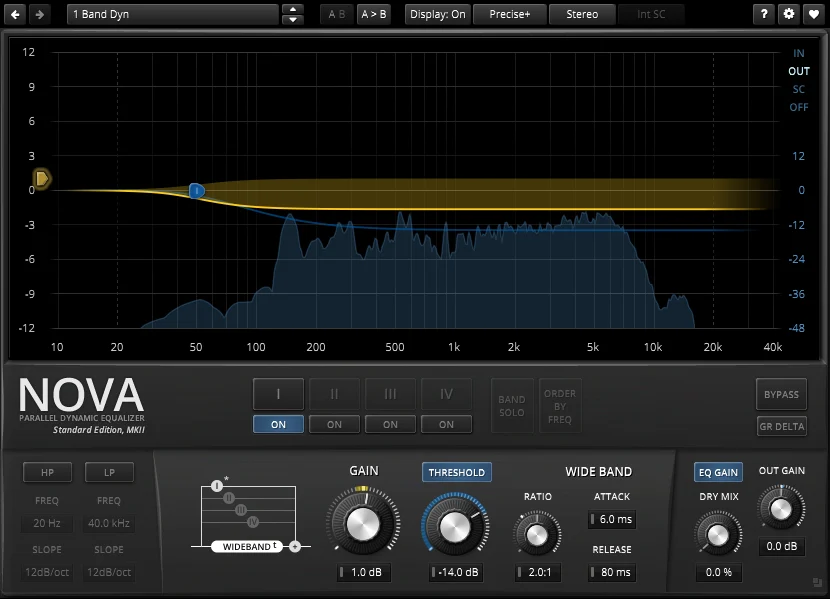
TDR Nova. Image: Tokyo Dawn Labs 03TDR Novaby Tokyo Dawn Labs
Parallel dynamic equaliserBest for: A free dynamic EQ for one or two targeted ducks
Nova is a parallel dynamic equaliser with an external sidechain. Set one band on the frequency where two sounds fight, key it from the one that should win, and it cuts only while that one plays. It takes more setting up than an automatic tool, and does exactly what you tell it.
Why pick it
- Free
- Precise control of one frequency at a time
Know first
- A handful of bands, each set by hand
- No view of the other track’s spectrum
Free · The paid Gentleman's Edition adds more
Tokyo Dawn Labs's page for TDR Nova (opens in a new tab)
Questions
What is frequency masking in mixing?
When a louder sound fills a range of frequencies, quieter sounds in the same range become harder to hear, or disappear. Both are still in the mix; your hearing simply stops separating them. It is why parts that sound clear soloed can vanish in the full mix.
How do I know if two tracks are masking each other?
Play the full mix and mute one of them. If the other suddenly sounds clearer, the muted one was masking it. An analyser that overlays both tracks shows where they overlap, but overlap on screen only matters if they also play at the same time and from the same place in the stereo image.
Does panning help with masking?
Yes. Sounds from different directions mask each other less, an effect called spatial release from masking. Moving a guitar away from a centred vocal can clear it more cleanly than an EQ cut. It does not help in the low end, which should stay in the centre, or on systems that play in mono.
Is sidechain EQ better than sidechain compression for unmasking?
For most sources, yes. Sidechain compression turns the whole track down when the trigger plays; a sidechain or dynamic EQ cuts only the frequencies the two share, so the rest of the track keeps its level. Compression still suits the pumping kick-and-bass sound when you want it to be heard.